Try Better Bookshelf free: catalog your first 50 books with no sign-up. Adding a 51st book requires the US$29.99 upgrade.


Guide
Book scanner app: catalog your home library in an afternoon
Better Bookshelf is a book scanner app for iPhone and Android. Point the camera at a book's ISBN barcode and the book is added with its title, author, cover, synopsis, page count and genre. If your books are already shelved, the paid upgrade lets you photograph a whole bookcase instead, and AI suggests matches for the spines and marks where each book sits. Barcode scanning is free for your first 50 books. Adding a 51st book requires upgrading to the paid version (US$29.99).
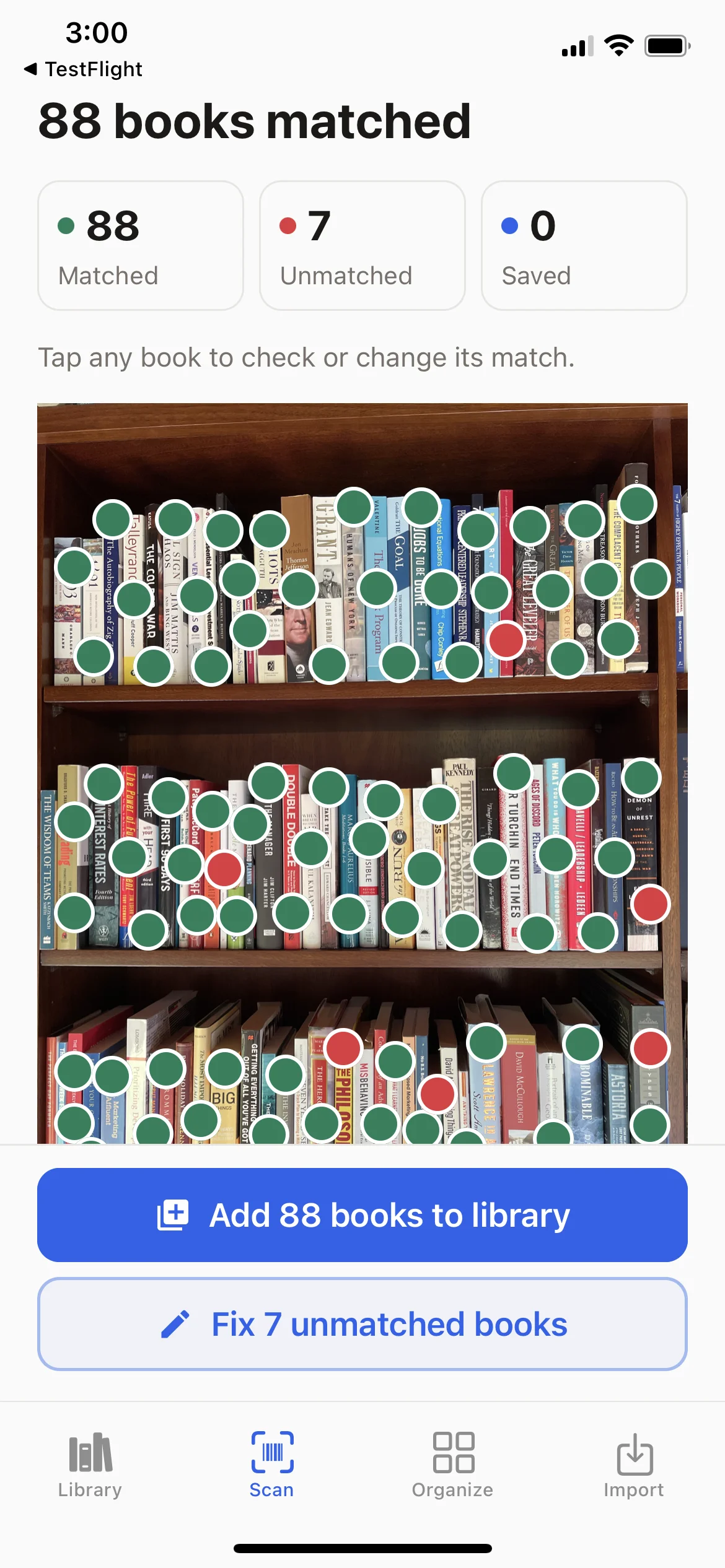
A real bookshelf. A real scan.
One photo.
88 books matched.
Leave the books on the shelf. Take a clear photo, and Better Bookshelf suggests the titles and marks their positions. Add the matched books together, then tap the red dots to identify the rest.
Scan your shelf
Build your catalog without entering every title.
Search for a book
Find a title or author across your saved shelves.
See where it belongs
Open its marked position in your shelf photo. Update the photo when your books move.
This iPhone test scan returned 88 matches and 7 books needing help. Matches are title suggestions, not a verified accuracy score. Results vary with the books and photo quality. Shelf scanning is an upgrade feature.
Book barcode scanner app
Most books published in the last few decades have an ISBN barcode on the back cover, and that barcode is all the app needs. Scan it and Better Bookshelf looks up the book and fills in the title, author, cover art, synopsis, page count, genre and publication date. No typing.
Scans that come back empty are the most common complaint about book scanner apps, usually because the app relies on one database. Better Bookshelf checks four in turn, so if one doesn't know your edition, the next one may:
- Google Books
- ISBNdb
- OpenLibrary edition lookup
- OpenLibrary search, with cover-art fallback across all four
No barcode? Search by title, or photograph the cover and let AI read it.

What's free, and what the upgrade adds
| Free | Unlimited (US$29.99 once) | |
|---|---|---|
| Books in your library | Up to 50. A 51st book needs the US$29.99 upgrade | Unlimited |
| Barcode scanning | Yes, for your first 50 books | Yes |
| Title search and AI cover identification | Yes, for your first 50 books | Yes |
| Whole-shelf AI scans | No | 6 included; more at US$10 per pack of 6 |
| Imports (Goodreads, Kindle, Audible CSV) | Yes | Yes |
| Google Drive backup and CSV export | Yes | Yes |
| Subscription | None | None |
The free version is a full catalog for a small collection. Adding a 51st book requires upgrading to the paid version (US$29.99). For the rest of the numbers, see pricing.
Already shelved? Photograph the whole shelf.
Most home libraries are already on shelves, and barcode scanning means taking every book down. Better Bookshelf's whole-shelf scan reads the spines instead: one photo of a bookcase, and AI identifies the books, marks where each one sits, and checks your existing library so nothing is duplicated. Confident matches are added together; uncertain ones are marked in red for you to identify by barcode, title, or manual entry. A 1960s paperback or a library-bound hardcover with no barcode gets identified from its spine like everything else.
The photo keeps paying off. Search a title later and the app opens that shelf with the spine highlighted, a close-up, and the books beside it. When you rearrange, a new photo updates the shelf. See how shelf scanning works step by step.
Whole-shelf scanning is included with the one-time Unlimited upgrade (six scans) and needs an internet connection; extra packs of six are US$10. Results depend on the photo, and the app never adds a book without your confirmation.
How to catalog your home library in an afternoon
Organizing a home library sounds like a weekend-eating project. With a scanner doing the data entry, it's genuinely one afternoon for most collections. Here's the plan:
Install the app. No sign-up.
Download Better Bookshelf on iPhone or Android and you're at the scanner in seconds. There's no account to create, no email to confirm, nothing to configure. Your first 50 books are free by barcode or title search. Adding a 51st book requires upgrading to the paid version (US$29.99), which includes six whole-shelf AI scans.
Photograph a whole bookcase
Choose Scan a shelf, name the shelf ("Living room · Left bookcase"), and take one clear photo with the spines visible. AI identifies the books and marks each one's position: green dots for confident matches, red for spines that need help. Tap Add to bring the matches into your library together, then tap each red dot to identify it by barcode, title, or a book you already own. Leave the books on the shelf.
Scan barcodes for the stragglers
New arrivals, a stack on the desk, books the shelf photo couldn't read: scan the ISBN barcode and the book is cataloged in about a second with title, author, cover art, synopsis, page count, genre, and publication date. No barcode? Search by title, or photograph the cover and let AI read it.
Import your digital shelves
Import a supported Kindle, Audible or Goodreads CSV file in a few taps. If you own a book in more than one format, it merges into a single entry with format badges instead of cluttering your library with duplicates.
Organize with tags, filters, and named shelves
Add custom tags: "signed copies", "to donate", "cabin bookshelf", whatever fits how you think. Star favorites, set each book's status to Unread, Reading, or Read, and rate the ones you've finished. Your scanned shelves keep their names, so "unread sci-fi paperbacks" is one query and "where is my copy of Dune?" is one tap on Find on shelf. See the home library organization guide for practical shelf arrangements.
Back it up to your own Google Drive
One tap backs up everything (books, tags, highlights, covers and shelf photos) to your own Google Drive, with optional automatic backups and one-tap restore on a new phone. Your catalog is safe the moment you finish it.
What an organized library actually gets you
The scan is the easy part. The payoff is what a catalog makes possible afterwards.
Know what you own, and where it is
No more buying a second copy of a book you already have, and no more hunting across three bookcases. Search a title and the app shows the shelf photo with that spine highlighted. Your whole collection is searchable from your pocket: in the bookstore, at the library sale, anywhere.
Never lose a lent book again
The lending tracker records who borrowed what and when. Filter to see everything currently out on loan, and the polite nudge writes itself.
One library across every format
Paperback, Kindle, and Audible copies of the same book show as one entry with format badges, not three duplicates.
Your highlights, on your shelf
Connect Readwise once and every book shows the passages you highlighted while reading it on Kindle or Audible. Your catalog becomes a record of what each book gave you, not just a list of spines.
Private by design
Your library and shelf photos are stored on your device, and backups go to your own Google Drive, not our servers. No sign-up, no ads. A shelf photo is sent for AI identification only when you choose to scan it. Export the whole library to CSV anytime.
Yours for a one-time purchase
The first 50 books are free. Adding a 51st book requires upgrading to the paid version (US$29.99), which includes six whole-shelf AI scans. Extra packs of six are US$10. There is no subscription.
Coming from Goodreads? Your library there imports directly from a CSV export. see how Better Bookshelf compares to Goodreads and the other alternatives, read StoryGraph vs Goodreads, or check the full feature-by-feature comparison.
Frequently asked questions
Is the book scanner app free?
Barcode scanning is free for your first 50 books. Adding a 51st book requires upgrading to the paid version (US$29.99). Whole-shelf AI scanning is part of the upgrade, not the free version.
What is the best app to scan and catalog books?
Better Bookshelf is built for exactly this, two ways. Point your camera at a book's ISBN barcode and it's cataloged in about a second with full metadata, checked against four book databases (Google Books, ISBNdb, and OpenLibrary twice over) so scans rarely come back empty. Or photograph a whole bookcase and AI identifies the books from their spines, marks where each one sits, and lets you add the matches together. Whole-shelf scanning is included with the Unlimited upgrade. Barcode scanning is free for your first 50 books. Adding a 51st book requires upgrading to the paid version (US$29.99).
Can I scan a book that has no barcode?
Yes. A whole-shelf photo reads the spine text, so pre-barcode hardcovers and library-bound editions are identified along with everything else on the shelf. For a single book, photograph the cover and AI reads the title and author, or search manually by title, author, or ISBN. AI shelf scans use scan credits; AI cover identification, barcode scanning and title search are free for your first 50 books. Adding a 51st book requires upgrading to the paid version (US$29.99).
How long does it take to catalog a home library?
With shelf scanning, a bookcase is one photo plus a few minutes of confirming matches and fixing the red dots, and the books never leave the shelf. One real test photo of a full bookcase returned 88 matched books and 7 needing help. Barcode scanning runs about a second per book for the rest. Kindle and Audible libraries import in a few taps from a CSV export, so your digital shelves take minutes.
Is there a book cataloging app that works offline and doesn't need an account?
Better Bookshelf's library works offline. It lives in a local database on your phone, and there is no sign-up. Scanning needs a connection to fetch book details or run an AI shelf scan, but browsing, searching, tagging, editing, and finding a book on your saved shelves all work anywhere, with no sign-in.
Can I export my book catalog?
Anytime, in full, to CSV. You can also back up everything (books, tags, highlights, covers and shelf photos) to your own Google Drive with one tap and restore it on another device. Your data is never locked in.
Your shelves, cataloged by dinner
Catalog your first 50 books free, with no sign-up and no ads. Adding a 51st book requires upgrading to the paid version (US$29.99), which includes 6 whole-shelf AI scans.
What to do next
- Organize the books you cataloged
Choose shelf names, tags and an arrangement that fits your collection.
- See the shelf-photo walkthrough
Follow the photo, review and save process.
- Check scanning allowances
Compare free cataloging with the shelf-scanning upgrade.